New York Paper Cut 3D Shadow Box SVG Guide
There is something uniquely satisfying about transforming a flat sheet of paper into a dimensional world you can hold in your hands. The New York Paper Cut 3D Shadow Box SVG offers exactly that experience, blending the nostalgia of one of the world's most iconic cities with the tactile joy of paper crafting. Whether you are a seasoned crafter looking for a quick weekend project or a parent searching for an engaging activity to do with your children, this design delivers impressive results without requiring advanced skills or expensive tools.
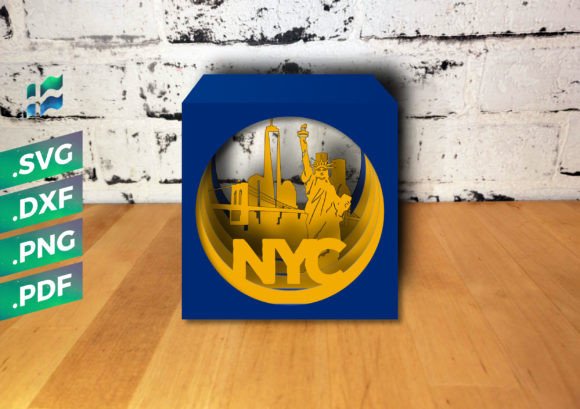
At its core, this project is a layered cube that captures the essence of New York City. It features distinct layers showcasing famous landmarks, including the Statue of Liberty standing tall on Liberty Island, the intricate spans of the Brooklyn Bridge connecting Manhattan and Brooklyn over the East River, and the dense, towering skyline of skyscrapers that defines the city's horizon. When assembled, these layers create a sense of depth and perspective that feels magical, turning a simple craft into a piece of art.
Why This DIY Project Stands Out
The appeal of the New York Cube lies in its simplicity and its visual impact. Many 3D paper projects require complex folding, intricate gluing, or hours of assembly. In contrast, this specific design is engineered to be straightforward. One of its most charming features is that you do not even need glue to assemble it. The pieces are designed to slot together or stack in a way that holds the structure firmly, making the process clean and frustration-free.
This "no-glue" aspect makes it an ideal candidate for family crafting sessions. If you have tried doing detailed crafts with kids before, you know that managing adhesive can often lead to messes and ruined layers. With this project, children can help identify the layers, arrange the order of the landmarks, and slide the pieces into place. It teaches spatial awareness and patience while resulting in a sturdy keepsake they can proudly display on a shelf or desk.
Beyond the family angle, this project serves as a fantastic gift idea. A handmade item always carries more weight than a store-bought souvenir, especially when it represents a specific memory or love for a city. Giving a friend who loves New York, a colleague moving to the Big Apple, or a traveler who misses the skyline a hand-assembled New York Cube shows thoughtfulness and effort. Despite being simple to make, the final product makes a big impression due to the professional look of the shadow box effect.
Tools and Materials You Will Need
One of the greatest advantages of working with digital cut files is the flexibility in how you produce the physical pieces. Depending on your available equipment and personal preference, you can approach this project in two main ways: using a digital cutting machine or cutting by hand.
If you own a cutting machine such as a Cricut, Silhouette, ScanNCut, or Brother model, this project is incredibly fast. The included SVG files are optimized for these machines, ensuring clean cuts every time. For those with CNC machines or specific software requirements, DXF files are also provided. These formats ensure compatibility across a wide range of hardware, allowing professionals and hobbyists alike to integrate this design into their existing workflows.
However, you do not need a machine to enjoy this craft. If you prefer the traditional route, all you need is a sharp craft knife and a self-healing cutting mat. The design is also available in PNG and PDF formats, which allows you to print the layers directly onto paper and cut them out manually. This is a great option for classrooms, community centers, or anyone who enjoys the meditative process of hand-cutting.
Regarding materials, the recommended paper size is standard A4 (297 x 210 mm), though US Letter or even 8.5 x 14 inches works perfectly fine. The key to a successful build is the paper weight. You should aim for cardstock between 135 and 280 gsm. Paper that is too thin may warp or fail to hold the 3D structure, while paper that is too thick might be difficult to cut or fold. A medium-weight cardstock provides the perfect balance of rigidity and ease of use.
How to Make the Cube
Assembly is where the magic happens, and thankfully, the process is intuitive. The package includes a detailed assembly instruction PDF to guide you, but the general workflow is simple enough to grasp quickly.
- Prepare Your Layers: Start by printing your chosen file format or loading the SVG/DXF into your cutting machine software. If cutting by hand, secure your paper to the cutting mat and carefully trace the outlines of the Statue of Liberty, the bridge, and the buildings using your craft knife. Take your time with the intricate details of the bridge cables and building windows.
- Organize the Pieces: Once cut, lay out all the layers in order. Typically, the background sky or furthest buildings go at the back, followed by the mid-ground structures like the bridge, and finally the foreground elements like the Statue of Liberty.
- Assemble the Structure: Begin stacking the layers. Since no glue is required, look for the tabs or slots designed into the file. Gently press the layers together, ensuring they align perfectly. The friction fit and the design geometry will keep everything in place.
- Final Touches: Check the alignment from different angles. Adjust any layers that might be slightly askew. Once satisfied, your New York Cube is ready to display.
Versatile Uses for Creators and Businesses
While this is a wonderful personal project, the New York Paper Cut 3D Shadow Box SVG also holds value for entrepreneurs and content creators. Bloggers and YouTubers in the DIY niche can use this project to create engaging tutorials, attracting viewers interested in travel-themed crafts or beginner-friendly paper art. The visual nature of the finished cube makes it highly shareable on social media platforms like Instagram and Pinterest.
For small business owners, particularly those selling handmade goods or party supplies, this design can be adapted for various commercial uses. Imagine creating custom favors for a New York-themed wedding, baby shower, or corporate event. Teachers can utilize the PDF versions for geography lessons, helping students visualize the layout of New York Harbor and the relationship between boroughs while practicing fine motor skills.
Furthermore, interior designers or home stagers might appreciate the aesthetic value of these cubes. They add a pop of architectural interest to bookshelves, mantels, or office desks without taking up much space. Because the design is scalable depending on the paper size used, you can create miniature versions for party decorations or larger statement pieces for wall displays.
Important Considerations Before You Start
Before diving into your project, there are a few practical things to keep in mind to ensure the best results. First, consider your color palette. While the default black silhouette style is classic and elegant, using colored cardstock can dramatically change the mood. Try using deep blues for the sky layer, grays for the buildings, and gold or copper for the Statue of Liberty to add realism.
Second, pay attention to the grain of your paper. If you are folding any tabs (though minimal in this design), folding against the grain can cause cracking. Always test a scrap piece of your chosen cardstock first. Additionally, if you are using a cutting machine, ensure your blade is sharp. Dull blades can tear the paper, ruining the delicate connections between the bridge cables or building spires.
Lastly, think about lighting. Shadow boxes rely on light and shadow to create their 3D effect. Placing your finished cube near a window or under a directed lamp will enhance the depth between the layers, making the Statue of Liberty appear to float in front of the skyline. This simple adjustment can elevate your project from a nice craft to a stunning piece of decor.
The New York Paper Cut 3D Shadow Box SVG is more than just a file download; it is an invitation to create something tangible and beautiful. Whether you are cutting by hand with a child or running a batch through your Silhouette for a client, the result is a timeless tribute to New York City that fits in the palm of your hand. With minimal tools, no glue, and maximum creative potential, it is a project that proves you don't need complexity to make something extraordinary.