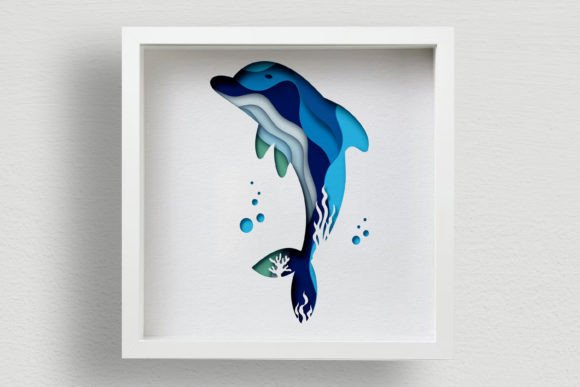
Creating Stunning Depth with 3D Dolphin Shadow Box SVG and Papercut Designs
There is a specific kind of magic that happens when flat materials transform into dimensional art. Whether you are decorating your home, diversifying the interior at your workplace, or searching for a truly unique gift for family and friends, the 3D Dolphin Shadow Box SVG offers a captivating blend of marine elegance and modern craftsmanship. This digital product is not just a simple image; it is a meticulously engineered vector design consisting of ten separate layers. When assembled correctly, these layers create a stunning illusion of depth, turning plywood, cardboard, paper, or plexiglass into a vibrant piece of wall art.
However, diving into the world of multi-layered papercut and laser cutting projects can be tricky for both beginners and seasoned professionals. Many enthusiasts rush into cutting without fully understanding the nuances of layering, material selection, or file compatibility. This often leads to frustration, wasted materials, and a final product that lacks the intended impact. To help you avoid these common pitfalls and ensure your Dolphin Mandala SVG project turns out perfectly, let's explore the essential details you need to know before you start cutting.
Understanding the Complexity of Multi-Layer Designs
The primary allure of the 3D Dolphin Shadow Box lies in its complexity. With ten distinct layers, this design relies on precise spacing and alignment to achieve its three-dimensional effect. A frequent mistake creators make is underestimating the importance of layer thickness. When working with materials like plywood or cardboard, the thickness of your material directly dictates the spacing between layers. If you use 3mm plywood but design your spacers for 1mm cardstock, the final assembly will look compressed and lose its shadow effect. Conversely, if your spacers are too thick for delicate paper, the structure may become unstable.
Practical Advice: Before sending any file to your machine, always measure your material with calipers. Do not rely on the labeled thickness on the package, as actual thickness can vary by brand. Adjust your spacer designs in your vector software to match your specific material. This small step ensures the "pop" of the dolphin remains consistent and visually striking.
Choosing the Right File Format for Your Machine
One of the most overlooked aspects of downloading digital cut files is selecting the correct format for your specific hardware. The provided ZIP folder for this design includes a comprehensive range of formats: .Ai, .SVG, .DWG, .EPS, .DXF, .PNG, and .PDF. While it might be tempting to grab the first file you see, using the wrong extension can lead to scaling issues, lost paths, or inefficient cutting times.
- CNC Laser and Router Users: If you are operating a CNC laser machine or a router, the .DXF or .DWG files are typically your best bet. These formats preserve precise geometric data required for industrial machines. Using a raster image like .PNG here would result in a failed cut.
- Hobbyist Cutters (Cricut, Silhouette): For those using desktop cutting machines, the .SVG file is the gold standard. It allows you to manipulate individual layers easily within design software. Avoid using .PDFs for these machines unless you are certain your software interprets vectors correctly, as some may flatten the layers.
- Graphic Designers: If you plan to modify the design or integrate it into a larger marketing layout, the .Ai or .EPS files offer the most editing flexibility.
A common error occurs when users forget to unzip the folder before attempting to import files. Most cutting software cannot read files directly from a compressed archive. Always extract the contents first to ensure all ten layers are accessible and intact.
Material Selection and Structural Integrity
The versatility of the Dolphin Multilayer Blueprint allows for use with plywood, cardboard, paper, and plexiglass. However, not all materials behave the same way during the cutting and assembly process. A significant misunderstanding among new creators is assuming that any material listed will yield the same aesthetic result without adjustment.
For instance, when using plexiglass, the transparency adds a beautiful glow, but it requires different cutting speeds and power settings compared to wood. Additionally, adhesives that work well on porous materials like paper can leave unsightly residues on acrylic. On the other hand, using heavy plywood for a delicate indoor wall hanging might require robust mounting hardware that isn't needed for a lightweight paper version.
Better Approach: Test your cut settings on a scrap piece of your chosen material first. Pay attention to edge burn on wood or melting on plastics. For assembly, consider using double-sided tape designed for your specific material or invisible glue dots for paper projects to maintain a clean look. Remember, the finished product dimensions are approximately 30x30 CM; ensure your material sheet is large enough to accommodate the layout with some margin for error.
Commercial Use and Licensing Clarity
For entrepreneurs and small business owners looking to diversify their product lines, understanding licensing terms is crucial. This design permits commercial use, but with a specific condition: you can only sell the physical product made according to the drawings. You cannot resell the digital files themselves. This distinction protects the original creator while allowing you to build a business around handmade goods.
A costly mistake some sellers make is bundling the digital files with physical kits or selling the SVGs on marketplaces. This violates the license and can lead to account bans or legal issues. Instead, focus on the value of your craftsmanship. Market your finished 3D Dolphin Shadow Box as a premium home decor item or a bespoke gift. Highlight the manual labor, the quality of materials, and the intricate assembly that goes into each piece. This approach not only adheres to the rules but also positions your product as a high-value item rather than a commodity.
Assembly Tips for a Professional Finish
Even with perfect cuts, the assembly phase is where the magic truly comes together—or falls apart. Rushing through the layering process is a common pitfall. With ten layers, misalignment by even a millimeter can throw off the entire symmetry of the dolphin mandala.
- Organize Your Layers: Lay out all ten pieces in order before applying any adhesive. Number them lightly on the back if necessary.
- Work from Back to Front: Start with the base layer and build upwards. This gives you better control over the alignment of the foreground elements.
- Check Lighting: Since this is a shadow box design, the interplay of light and shadow is key. Assemble near a window or under a lamp to see how the shadows fall between layers as you go.
If you find that you need a different file format or size to fit a specific frame or machine capability, do not hesitate to contact the designer. Customization is often possible, and asking beforehand saves you from trying to forcibly scale a vector, which can distort line weights and ruin cut quality.
Final Thoughts on Creating Your Masterpiece
The 3D Dolphin Shadow Box SVG represents more than just a cutting file; it is an opportunity to create something tangible and beautiful. Whether you are a hobbyist looking for a weekend project or a professional expanding your catalog, paying attention to the details—file formats, material properties, layer spacing, and licensing—will set you apart. By avoiding common shortcuts and approaching the project with patience and precision, you ensure that your final piece is not just another decoration, but a standout work of art that brings the ocean's grace into any space.