Understanding 3D Sunflowers SVG: A Practical Guide for Crafters and Designers
In the evolving landscape of digital crafting and graphic design, the demand for layered, dimensional assets has grown significantly. Among these, 3D Sunflowers SVG files have emerged as a popular choice for creators looking to add depth and texture to their projects without relying on complex manual layering. Unlike traditional flat vector images, these files are engineered with multiple layers that, when cut from different materials or colors and assembled, create a convincing illusion of three-dimensionality. This guide explores what makes this specific format distinct, how it compares to other design resources, and the practical considerations involved in selecting the right tool for your creative workflow.
Defining the 3D Sunflowers SVG Format
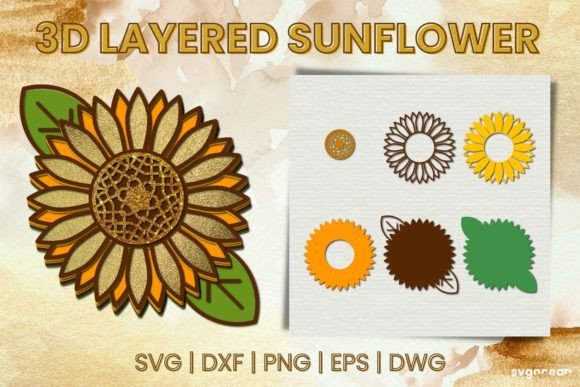
At its core, a 3D Sunflowers SVG is not a single image but a collection of coordinated vector paths designed to work together. When you acquire a bundle of these files, you are typically receiving a suite of assets intended to be stacked. The "3D" effect is achieved through shadow layers, highlight layers, and base layers that mimic the natural curvature and depth of a sunflower's petals and center.
What distinguishes this format from standard clipart is the precision required in the cut lines. A high-quality bundle often includes seven distinct SVG files, each representing a different tier of the flower's anatomy. This allows the user to cut layers from cardstock, vinyl, or heat transfer material in varying shades to build a physical model. The inclusion of complementary formats such as PNG for sublimation or digital printing, EPS for professional print workflows, and DXF or DWG for CAD-compatible machinery ensures that the design remains versatile across different software ecosystems.
Comparative Analysis: Layered SVGs vs. Flat Vectors and Raster Images
When evaluating design resources, it is essential to understand where layered 3D files fit within the broader spectrum of digital assets. The primary comparison lies between 3D Sunflowers SVG bundles and standard flat vector illustrations.
- Flat Vectors: Traditional SVGs are excellent for screen printing, simple decals, and web graphics where a single color or gradient suffices. They are lightweight and easy to manipulate but lack the structural complexity needed for dimensional crafts. If your goal is a quick, single-layer cut, a flat vector is more efficient.
- Raster Images (PNG/JPG): While high-resolution PNGs included in these bundles are useful for sublimation tumblers or digital mockups, they cannot be scaled infinitely without quality loss, nor can they be easily separated into cuttable layers by machines like Cricut or Silhouette. They serve a different purpose entirely—visual representation rather than physical construction.
- Layered 3D SVGs: These occupy a niche for users who want the scalability of vectors combined with the tactile appeal of paper engineering. The trade-off is time; assembling a 3D sunflower requires patience and alignment precision that a flat decal does not.
For a crafter deciding between these options, the decision often hinges on the end product. If you are producing items for a high-volume sale where speed is critical, flat vectors may be superior. However, for boutique items, greeting cards, or home decor where perceived value is heightened by texture, the 3D Sunflowers SVG approach offers a competitive edge.
Software Compatibility and Workflow Integration
A significant factor in choosing any digital asset is its compatibility with your existing toolkit. The versatility of a comprehensive 3D Sunflowers SVG bundle lies in its multi-format delivery. Because these files are distributed in a ZIP archive containing SVG, PNG, EPS, DXF, and DWG formats, they bridge the gap between hobbyist and professional environments.
For users of browser-based or entry-level cutting software like Cricut Design Space or Silhouette Studio, the native SVG files are ideal. These programs handle layered imports well, allowing users to ungroup the seven files and assign different colors to visualize the assembly before cutting. Conversely, users working in Adobe Illustrator or Inkscape might prefer the EPS or SVG formats for finer control over anchor points and path simplification.
It is worth noting that older versions of cutting software sometimes struggle with highly complex layered files. In such cases, having access to the DXF format can be a lifesaver, as it is often more universally recognized by legacy systems. Similarly, professionals using CorelDRAW or Sure Cuts A Lot (SCAL) will find the EPS and DWG files integrate seamlessly into their established vector workflows. This breadth of format support reduces the friction of adoption, making the bundle a safer investment for users who may switch software platforms in the future.
Practical Applications and Best-Fit Scenarios
Understanding the strengths of 3D Sunflowers SVG files helps in identifying the best scenarios for their use. These designs excel in applications where light and shadow play a crucial role in the aesthetic.
- Paper Flower Arrangements: This is the most common application. By cutting the seven layers from graduated shades of yellow and brown cardstock, crafters can create large-scale wall art or centerpiece flowers that look remarkably lifelike.
- Greeting Cards and Invitations: A single 3D sunflower adhered to the front of a card adds a premium feel that flat printing cannot match. The depth invites interaction, making the recipient more likely to engage with the message.
- Apparel and Accessories: While primarily for paper, the PNG files included in the bundle allow for sublimation on t-shirts or tote bags, while the vinyl-compatible layers can be used for heat transfer designs, provided the layers are simplified for wearability.
- Home Decor Signs: Wooden signs created with CNC routers can utilize the DXF or DWG files to carve recessed areas for painting, mimicking the 3D effect through depth rather than stacking.
However, these files are not without limitations. For projects requiring extreme durability outdoors, the multiple glued layers of a paper 3D flower may delaminate due to humidity. In such cases, a single-layer metal cutout or a printed raster image sealed with resin might be a more durable alternative. Additionally, the intricate nature of the inner petals in some 3D designs can lead to "weeding" difficulties if cut from adhesive vinyl, making them less suitable for small decals compared to simplified flat icons.
Evaluating Quality and Decision Factors
When shopping for 3D Sunflowers SVG bundles, several technical factors should influence your purchasing decision beyond just the visual preview.
Layer Count and Logic: A bundle offering seven SVG files suggests a high level of detail. Verify that the layers are logically separated. Poorly designed 3D files may have overlapping paths that cause cutting errors or make assembly frustrating. High-quality files will have clean nodes and logical separation between shadows, mid-tones, and highlights.
File Organization: Since these bundles come in a single ZIP file, ease of extraction is vital. Ensure you have the necessary tools to unzip the archive on your device. Once extracted, the files should be clearly named (e.g., "Sunflower_Layer_01_Shadow") to streamline the workflow. Disorganized folders can significantly slow down production time.
Scalability: One of the primary advantages of vector formats is infinite scalability. Test the files by resizing them to both very small and very large dimensions in your software. A robust 3D Sunflowers SVG should maintain its structural integrity and cut-path clarity regardless of size, whereas lower-quality conversions may result in broken lines or overly complex node counts that confuse cutting machines.
Making the Right Choice for Your Project
Ultimately, the decision to use 3D Sunflowers SVG files depends on your specific goals, available time, and target audience. If you are a hobbyist looking to create a unique, hand-crafted gift, the time investment required to assemble the layers is part of the charm and value. The resulting dimensional piece offers a tangible quality that stands out in a market saturated with flat prints.
Conversely, if you are running a high-speed production line for custom t-shirts or stickers, the complexity of 3D layering might introduce bottlenecks. In those instances, utilizing the PNG or simplified flat SVG components of the same bundle might be the more strategic operational choice.
By understanding the distinctions between file formats, the capabilities of your software, and the physical requirements of your final product, you can leverage these assets effectively. Whether you are using Adobe Photoshop for mockups or Cricut Design Space for physical cuts, the versatility of a well-structured bundle provides the flexibility to adapt your approach as your project needs evolve. The key is to view the 3D Sunflowers SVG not just as an image, but as a system of parts designed to be transformed into something greater than the sum of its layers.